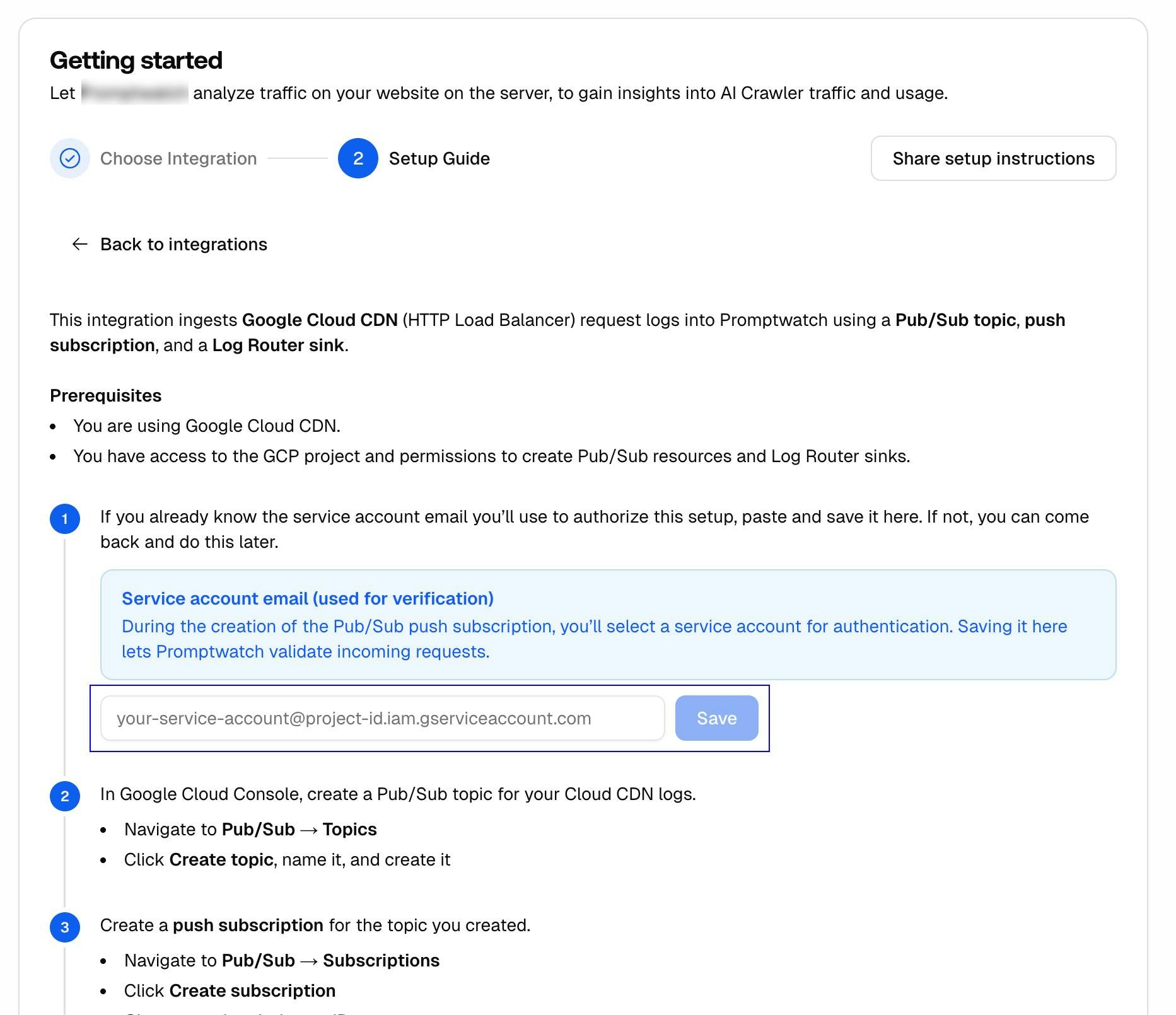
This integration ingests Google Cloud CDN (HTTP Load Balancer) request logs into Promptwatch using a Pub/Sub topic, push subscription, and a Log Router sink. Make sure to only route logs from your project’s website.Documentation Index
Fetch the complete documentation index at: https://promptwatch.com/docs/llms.txt
Use this file to discover all available pages before exploring further.
Prerequisites
- You are using Google Cloud CDN / HTTP(S) Load Balancer
- You have access to the GCP project and permissions to create Pub/Sub resources and Log Router sinks
Step 1: Service Account (Verification)
If you already know the service account email you’ll use to authorize this setup, note it down. You’ll need it when creating the push subscription in Step 3. In Promptwatch, navigate to Crawler Logs → Settings, click the Google Cloud button, and enter the service account email you select when creating the push subscription. This lets Promptwatch validate incoming requests.The service account email is used for verification. During the creation of the Pub/Sub push subscription, you’ll select a service account for authentication.
Step 2: Create Pub/Sub Topic
In Google Cloud Console, create a Pub/Sub topic for your Cloud CDN logs.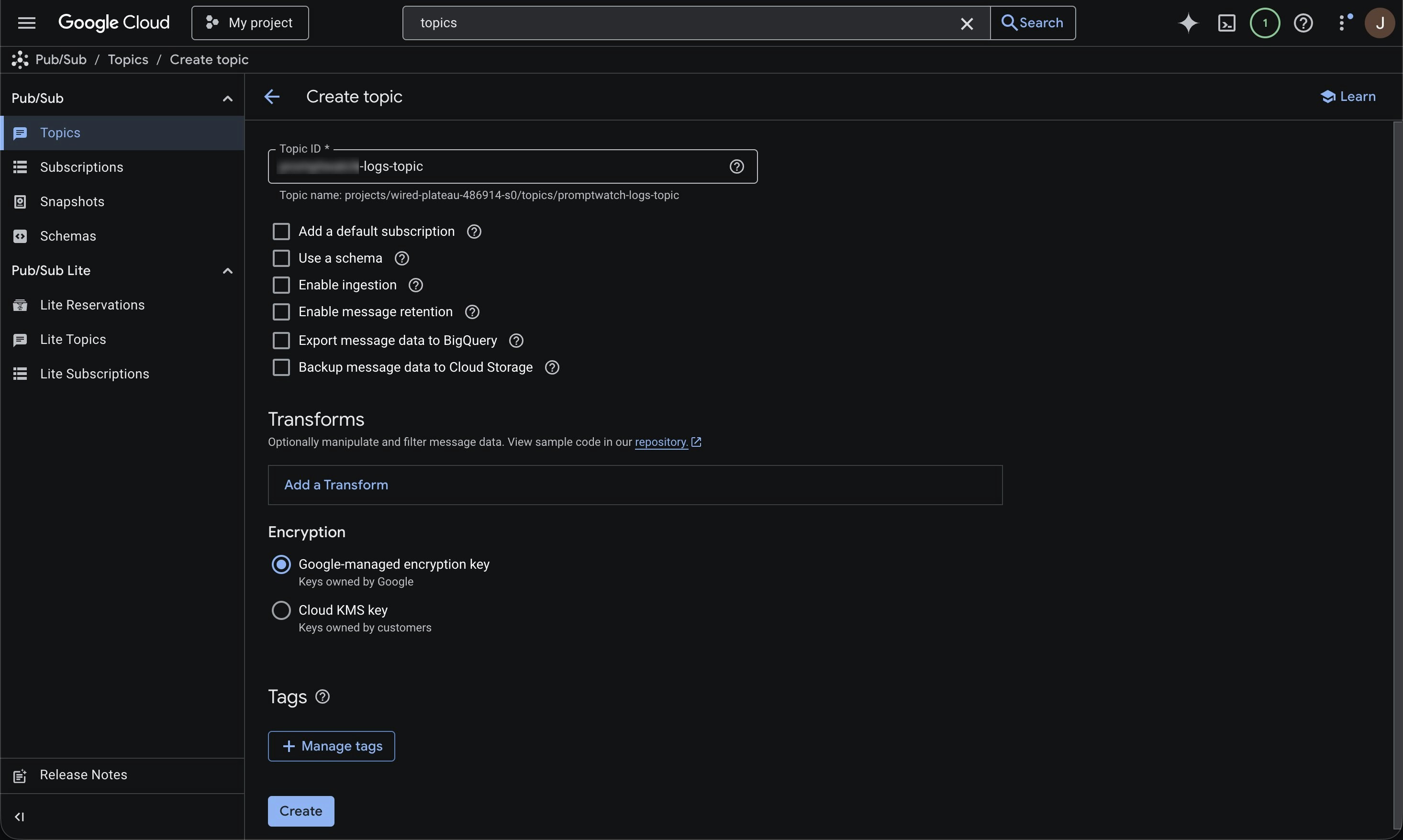
- Navigate to Pub/Sub → Topics
- Click Create topic, name it, and create it
Step 3: Create Push Subscription
Create a push subscription for the topic you created.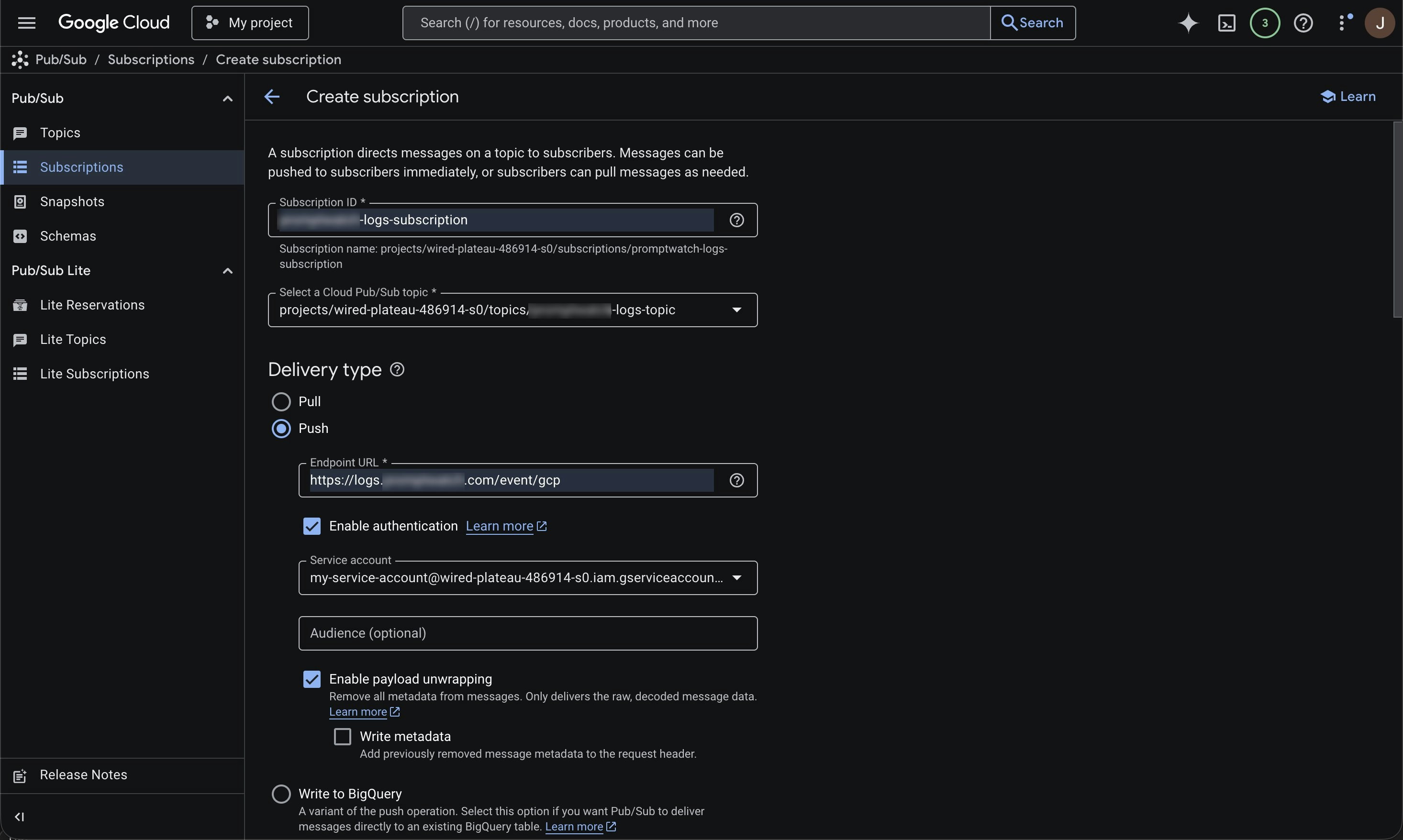
- Navigate to Pub/Sub → Subscriptions
- Click Create subscription
- Give your subscription an ID
- Select the topic you created in Step 2
- Set Delivery type to Push
- Set the endpoint URL to:
- Click Enable authentication and select a service account
- Enable payload unwrapping
You can also adjust retention, retry policy, and throughput settings in this setup.
Step 4: Add Message Transform
Add a Pub/Sub message transform to reduce the payload before sending to Promptwatch.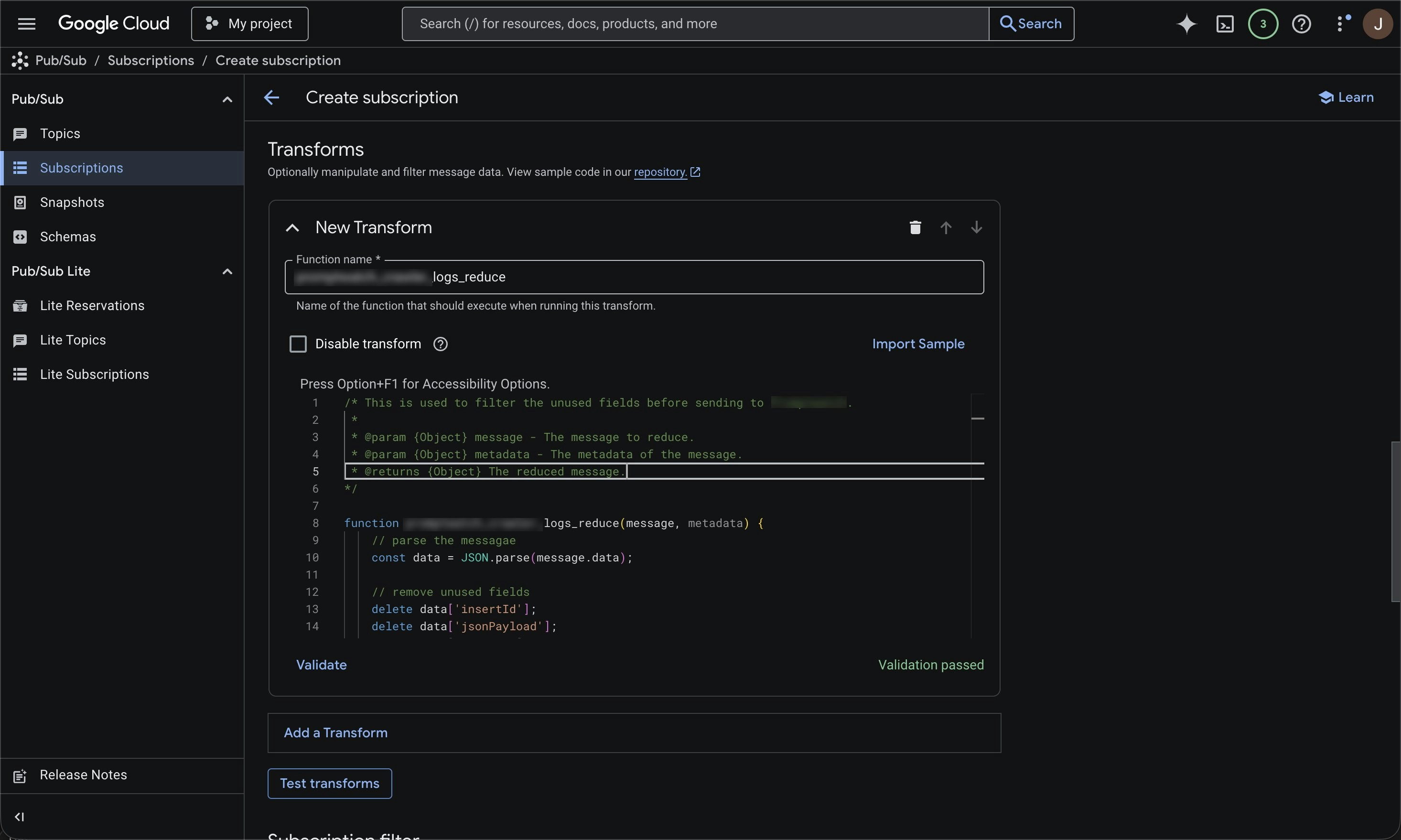
- In your subscription, click Add a transform
- Set the function name to log_reduce
- Paste this function and click Validate:
This transform drops unneeded fields before sending to Promptwatch. It reduces export volume, improves performance, and enhances data security.
Optional: Filter on known AI Crawler user agents
Promptwatch identifies AI crawlers automatically and only stores AI crawler visits, all other traffic is discarded. You can safely send all your server logs without worrying about non-crawler data being retained. If you prefer to only forward AI crawler traffic, you can use the user agents listed below to pre-filter on your side. Keep in mind that you’ll need to maintain this list yourself as new crawlers emerge.OpenAI (4)
OpenAI (4)
| Name | User Agent | Full User Agent | Description |
|---|---|---|---|
| GPT Bot | GPTBot | Mozilla/5.0 AppleWebKit/537.36 (KHTML, like Gecko); compatible; GPTBot/1.3; +https://openai.com/gptbot | Used to crawl content for training OpenAI’s generative AI foundation models. |
| SearchBot | OAI-SearchBot | Mozilla/5.0 (Macintosh; Intel Mac OS X 10_15_7) AppleWebKit/537.36 (KHTML, like Gecko) Chrome/131.0.0.0 Safari/537.36; compatible; OAI-SearchBot/1.3; +https://openai.com/searchbot | Used by ChatGPT search to surface websites in search results. |
| ChatGPT Citations | ChatGPT-User | Mozilla/5.0 AppleWebKit/537.36 (KHTML, like Gecko); compatible; ChatGPT-User/1.0; +https://openai.com/bot | Used for user actions in ChatGPT when visiting web pages. |
| Ads Bot | OAI-AdsBot | Mozilla/5.0 AppleWebKit/537.36 (KHTML, like Gecko); compatible; OAI-AdsBot/1.0; +https://openai.com/adsbot | Used to validate the safety of web pages submitted as ads on ChatGPT. |
Anthropic (5)
Anthropic (5)
| Name | User Agent | Full User Agent | Description |
|---|---|---|---|
| Claude Bot | ClaudeBot | Mozilla/5.0 AppleWebKit/537.36 (KHTML, like Gecko); compatible; ClaudeBot/1.0; +claudebot@anthropic.com) | Used to crawl content for training Anthropic’s generative AI models. |
| Claude Citations | Claude-User | Mozilla/5.0 AppleWebKit/537.36 (KHTML, like Gecko); compatible; Claude-User/1.0; +claudebot@anthropic.com) | When individuals ask questions to Claude or use Claude Code, it may access websites using a Claude-User agent. |
| Claude Search Bot | Claude-SearchBot | Mozilla/5.0 AppleWebKit/537.36 (KHTML, like Gecko; compatible; Claude-SearchBot/1.0; +searchbot@anthropic.com) | Navigates the web to improve search result quality for users. |
| Claude Web | claude-web | Mozilla/5.0 (compatible; claude-web/1.0; +http://www.anthropic.com/bot.html) | Targeted crawler for recent web content, feeding the Claude browser agent with updated site data. |
| Anthropic AI | anthropic-ai | Mozilla/5.0 (compatible; anthropic-ai/1.0; +http://www.anthropic.com/bot.html) | Primary Anthropic crawler that collects broad web data for Claude model development. |
Google (3)
Google (3)
| Name | User Agent | Full User Agent | Description |
|---|---|---|---|
| Gemini | Google-Extended | Mozilla/5.0 (compatible; Google-Extended/1.0; +http://www.google.com/bot.html) | Controls whether content can be used for training Gemini AI models. |
| Google Mobile Agent | Google-Agent | Mozilla/5.0 (Linux; Android 6.0.1; Nexus 5X Build/MMB29P) AppleWebKit/537.36 (KHTML, like Gecko) Chrome/W.X.Y.Z Mobile Safari/537.36 (compatible; Google-Agent; +https://developers.google.com/crawling/docs/crawlers-fetchers/google-agent) | Used by Google AI agents to autonomously browse the web and complete tasks on behalf of users (mobile). |
| Google Desktop Agent | Google-Agent | Mozilla/5.0 AppleWebKit/537.36 (KHTML, like Gecko; compatible; Google-Agent; +https://developers.google.com/crawling/docs/crawlers-fetchers/google-agent) Chrome/W.X.Y.Z Safari/537.36 | Used by Google AI agents to autonomously browse the web and complete tasks on behalf of users (desktop). |
Perplexity (2)
Perplexity (2)
| Name | User Agent | Full User Agent | Description |
|---|---|---|---|
| Perplexity Bot | PerplexityBot | Mozilla/5.0 AppleWebKit/537.36 (KHTML, like Gecko; compatible; PerplexityBot/1.0; +https://perplexity.ai/perplexitybot) | Used to surface and link websites in Perplexity search results. |
| Perplexity Citations | Perplexity-User | Mozilla/5.0 AppleWebKit/537.36 (KHTML, like Gecko; compatible; Perplexity-User/1.0; +https://perplexity.ai/perplexity-user) | Used for user actions in Perplexity when visiting web pages to answer questions. |
Cohere (1)
Cohere (1)
| Name | User Agent | Full User Agent | Description |
|---|---|---|---|
| Cohere AI | cohere-ai | Mozilla/5.0 (compatible; cohere-ai/1.0; +http://www.cohere.ai/bot.html) | Collects textual data for Cohere’s language models, helping refine large-scale text generation. |
Mistral (2)
Mistral (2)
| Name | User Agent | Full User Agent | Description |
|---|---|---|---|
| Mistral AI Citations | MistralAI-User | Mozilla/5.0 AppleWebKit/537.36 (KHTML, like Gecko; compatible; MistralAI-User/1.0; +https://docs.mistral.ai/robots) | Used for user actions in LeChat when visiting web pages to answer questions. |
| Mistral AI Index | MistralAI-Index | Mozilla/5.0 AppleWebKit/537.36 (KHTML, like Gecko; compatible; MistralAI-Index/1.0; +https://docs.mistral.ai/robots) | Used to index content for Mistral AI’s search engine, which helps answer user questions in Le Chat. |
DeepSeek (1)
DeepSeek (1)
| Name | User Agent | Full User Agent | Description |
|---|---|---|---|
| DeepSeek | DeepSeekBot | Mozilla/5.0 (compatible; DeepSeekBot/1.0; +http://www.deepseek.com/bot.html) | Used to crawl content for training DeepSeek’s generative AI models. |
xAI / Grok (3)
xAI / Grok (3)
| Name | User Agent | Full User Agent | Description |
|---|---|---|---|
| Grok Bot | GrokBot | GrokBot/1.0 (+https://x.ai) | Used for training Grok AI. |
| Grok Search | xAI-Grok | xAI-Grok/1.0 (+https://grok.com) | Used for Grok’s search capabilities. |
| Grok Deep Search | Grok-DeepSearch | Grok-DeepSearch/1.0 (+https://x.ai) | Used for Grok’s advanced search capabilities. |
Step 5: Create Log Router Sink
Create a Log Router sink to export the HTTP Load Balancer logs into your Pub/Sub topic.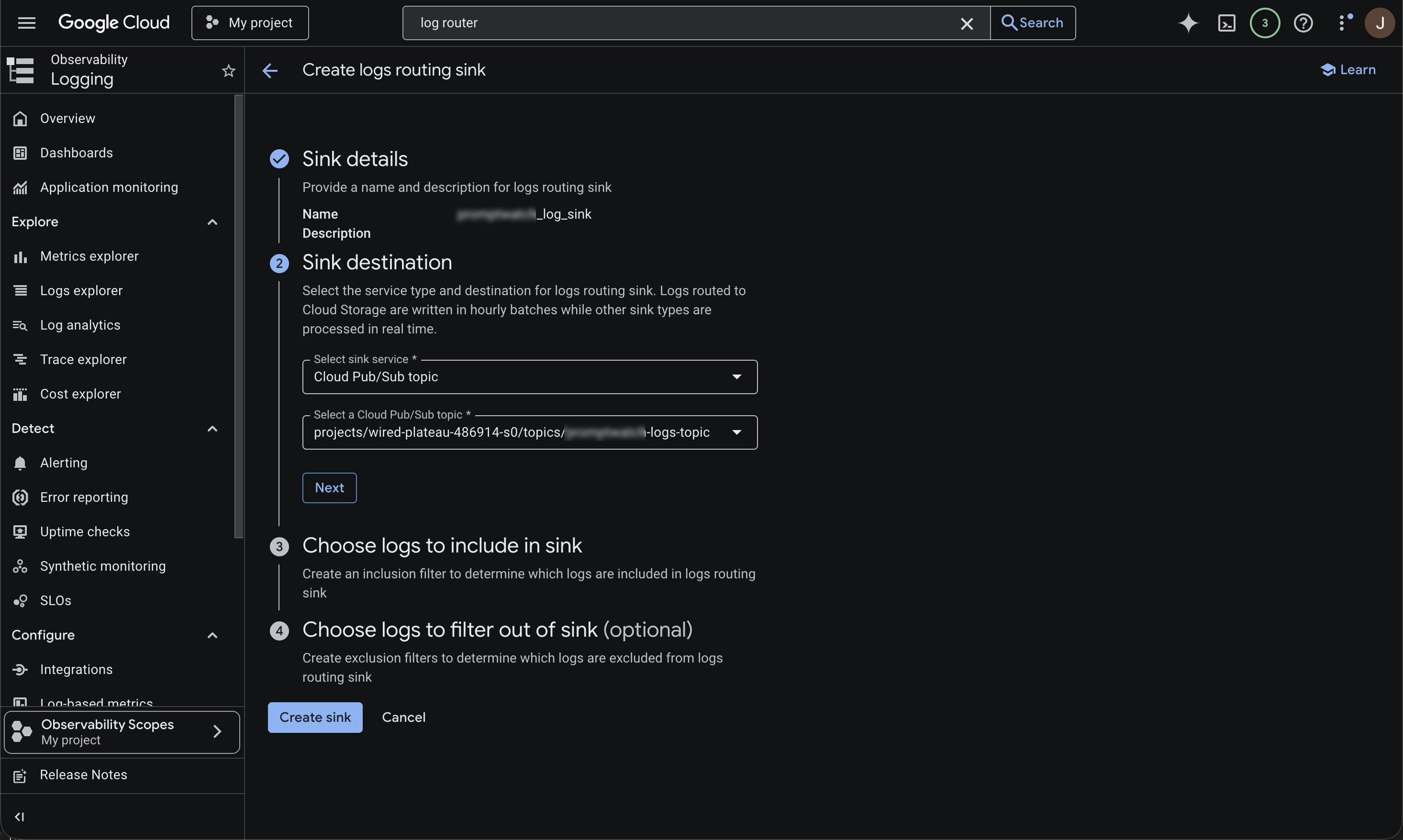
- Search for Log Router (or go to Logging → Log Router)
- Click Create sink
- Give your sink a name
- For destination, choose Cloud Pub/Sub topic and select the topic from Step 2
- Add a filter similar to the following:
Step 6: Save Service Account in Promptwatch
In Promptwatch, navigate to Crawler Logs → Settings, click the Google Cloud button, and enter the service account email you selected when creating the push subscription in Step 3.