Documentation Index
Fetch the complete documentation index at: https://promptwatch.com/docs/llms.txt
Use this file to discover all available pages before exploring further.
Step 1: Create an API Key
Create an API key in Promptwatch. Go to Settings → API Keys in your Promptwatch dashboard.Step 2: Create a Worker
Create a new Cloudflare Worker in your account:- Go to your Cloudflare dashboard → Workers & Pages
- Click Create Worker
- Give it a name (e.g.,
promptwatch-analytics) - Replace the default code with the script below
Step 3: Worker Script
Copy the following script and paste it into the Cloudflare Worker editor:Optional: Filter on known AI Crawler user agents
Promptwatch identifies AI crawlers automatically and only stores AI crawler visits, all other traffic is discarded. You can safely send all your server logs without worrying about non-crawler data being retained. If you prefer to only forward AI crawler traffic, you can use the user agents listed below to pre-filter on your side. Keep in mind that you’ll need to maintain this list yourself as new crawlers emerge.OpenAI (4)
OpenAI (4)
| Name | User Agent | Full User Agent | Description |
|---|---|---|---|
| GPT Bot | GPTBot | Mozilla/5.0 AppleWebKit/537.36 (KHTML, like Gecko); compatible; GPTBot/1.3; +https://openai.com/gptbot | Used to crawl content for training OpenAI’s generative AI foundation models. |
| SearchBot | OAI-SearchBot | Mozilla/5.0 (Macintosh; Intel Mac OS X 10_15_7) AppleWebKit/537.36 (KHTML, like Gecko) Chrome/131.0.0.0 Safari/537.36; compatible; OAI-SearchBot/1.3; +https://openai.com/searchbot | Used by ChatGPT search to surface websites in search results. |
| ChatGPT Citations | ChatGPT-User | Mozilla/5.0 AppleWebKit/537.36 (KHTML, like Gecko); compatible; ChatGPT-User/1.0; +https://openai.com/bot | Used for user actions in ChatGPT when visiting web pages. |
| Ads Bot | OAI-AdsBot | Mozilla/5.0 AppleWebKit/537.36 (KHTML, like Gecko); compatible; OAI-AdsBot/1.0; +https://openai.com/adsbot | Used to validate the safety of web pages submitted as ads on ChatGPT. |
Anthropic (5)
Anthropic (5)
| Name | User Agent | Full User Agent | Description |
|---|---|---|---|
| Claude Bot | ClaudeBot | Mozilla/5.0 AppleWebKit/537.36 (KHTML, like Gecko); compatible; ClaudeBot/1.0; +claudebot@anthropic.com) | Used to crawl content for training Anthropic’s generative AI models. |
| Claude Citations | Claude-User | Mozilla/5.0 AppleWebKit/537.36 (KHTML, like Gecko); compatible; Claude-User/1.0; +claudebot@anthropic.com) | When individuals ask questions to Claude or use Claude Code, it may access websites using a Claude-User agent. |
| Claude Search Bot | Claude-SearchBot | Mozilla/5.0 AppleWebKit/537.36 (KHTML, like Gecko; compatible; Claude-SearchBot/1.0; +searchbot@anthropic.com) | Navigates the web to improve search result quality for users. |
| Claude Web | claude-web | Mozilla/5.0 (compatible; claude-web/1.0; +http://www.anthropic.com/bot.html) | Targeted crawler for recent web content, feeding the Claude browser agent with updated site data. |
| Anthropic AI | anthropic-ai | Mozilla/5.0 (compatible; anthropic-ai/1.0; +http://www.anthropic.com/bot.html) | Primary Anthropic crawler that collects broad web data for Claude model development. |
Google (3)
Google (3)
| Name | User Agent | Full User Agent | Description |
|---|---|---|---|
| Gemini | Google-Extended | Mozilla/5.0 (compatible; Google-Extended/1.0; +http://www.google.com/bot.html) | Controls whether content can be used for training Gemini AI models. |
| Google Mobile Agent | Google-Agent | Mozilla/5.0 (Linux; Android 6.0.1; Nexus 5X Build/MMB29P) AppleWebKit/537.36 (KHTML, like Gecko) Chrome/W.X.Y.Z Mobile Safari/537.36 (compatible; Google-Agent; +https://developers.google.com/crawling/docs/crawlers-fetchers/google-agent) | Used by Google AI agents to autonomously browse the web and complete tasks on behalf of users (mobile). |
| Google Desktop Agent | Google-Agent | Mozilla/5.0 AppleWebKit/537.36 (KHTML, like Gecko; compatible; Google-Agent; +https://developers.google.com/crawling/docs/crawlers-fetchers/google-agent) Chrome/W.X.Y.Z Safari/537.36 | Used by Google AI agents to autonomously browse the web and complete tasks on behalf of users (desktop). |
Perplexity (2)
Perplexity (2)
| Name | User Agent | Full User Agent | Description |
|---|---|---|---|
| Perplexity Bot | PerplexityBot | Mozilla/5.0 AppleWebKit/537.36 (KHTML, like Gecko; compatible; PerplexityBot/1.0; +https://perplexity.ai/perplexitybot) | Used to surface and link websites in Perplexity search results. |
| Perplexity Citations | Perplexity-User | Mozilla/5.0 AppleWebKit/537.36 (KHTML, like Gecko; compatible; Perplexity-User/1.0; +https://perplexity.ai/perplexity-user) | Used for user actions in Perplexity when visiting web pages to answer questions. |
Cohere (1)
Cohere (1)
| Name | User Agent | Full User Agent | Description |
|---|---|---|---|
| Cohere AI | cohere-ai | Mozilla/5.0 (compatible; cohere-ai/1.0; +http://www.cohere.ai/bot.html) | Collects textual data for Cohere’s language models, helping refine large-scale text generation. |
Mistral (2)
Mistral (2)
| Name | User Agent | Full User Agent | Description |
|---|---|---|---|
| Mistral AI Citations | MistralAI-User | Mozilla/5.0 AppleWebKit/537.36 (KHTML, like Gecko; compatible; MistralAI-User/1.0; +https://docs.mistral.ai/robots) | Used for user actions in LeChat when visiting web pages to answer questions. |
| Mistral AI Index | MistralAI-Index | Mozilla/5.0 AppleWebKit/537.36 (KHTML, like Gecko; compatible; MistralAI-Index/1.0; +https://docs.mistral.ai/robots) | Used to index content for Mistral AI’s search engine, which helps answer user questions in Le Chat. |
DeepSeek (1)
DeepSeek (1)
| Name | User Agent | Full User Agent | Description |
|---|---|---|---|
| DeepSeek | DeepSeekBot | Mozilla/5.0 (compatible; DeepSeekBot/1.0; +http://www.deepseek.com/bot.html) | Used to crawl content for training DeepSeek’s generative AI models. |
xAI / Grok (3)
xAI / Grok (3)
| Name | User Agent | Full User Agent | Description |
|---|---|---|---|
| Grok Bot | GrokBot | GrokBot/1.0 (+https://x.ai) | Used for training Grok AI. |
| Grok Search | xAI-Grok | xAI-Grok/1.0 (+https://grok.com) | Used for Grok’s search capabilities. |
| Grok Deep Search | Grok-DeepSearch | Grok-DeepSearch/1.0 (+https://x.ai) | Used for Grok’s advanced search capabilities. |
Step 4: Environment Variables
In your Worker settings, add these environment variables:YOUR_API_KEY with your actual API key.
Step 5: Deploy to a Route
Deploy your Worker to a route:- Go to your domain’s Workers Routes in Cloudflare
- Add a new route:
yourdomain.com/* - Select your Worker from the dropdown
- Save and deploy
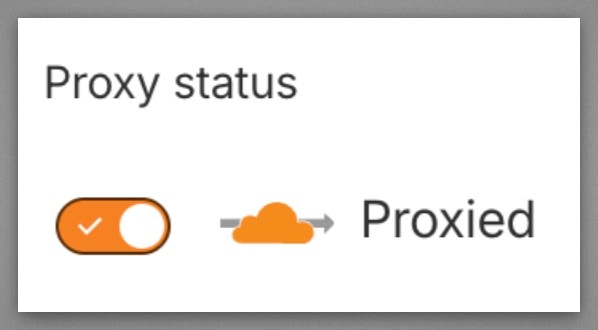
Step 6: Verify Cloudflare Proxy is Enabled
Verify your domain’s DNS records have the Cloudflare proxy enabled (orange cloud icon). Workers Routes only intercept traffic that flows through the Cloudflare network. If the proxy is off (gray cloud / “DNS only”), requests go directly to your origin and bypass the Worker entirely. Go to your Cloudflare dashboard → DNS → Records and make sure the Proxy status shows the orange cloud (“Proxied”) for your domain’s A/AAAA/CNAME records.